A promising drum groove can quickly become a programming exercise. Changing one hi-hat pattern might mean disturbing a kick arrangement that already works. Noise Lab’s Beat Designer offers another approach, letting producers explore rhythmic variations while retaining selected elements. Instead of programming every hit individually, users can navigate a collection of rhythmic possibilities and shape the parts they want to develop.
The Stockholm-based manufacturer lists the Eurorack module on its official product page. Specialist coverage dated November 23, 2026, has also brought attention to the release. For producers, the interesting part is how Beat Designer connects rhythmic exploration with a more organized arrangement workflow.
Beat Designer: A Sequencer, Not a Drum Sound Source
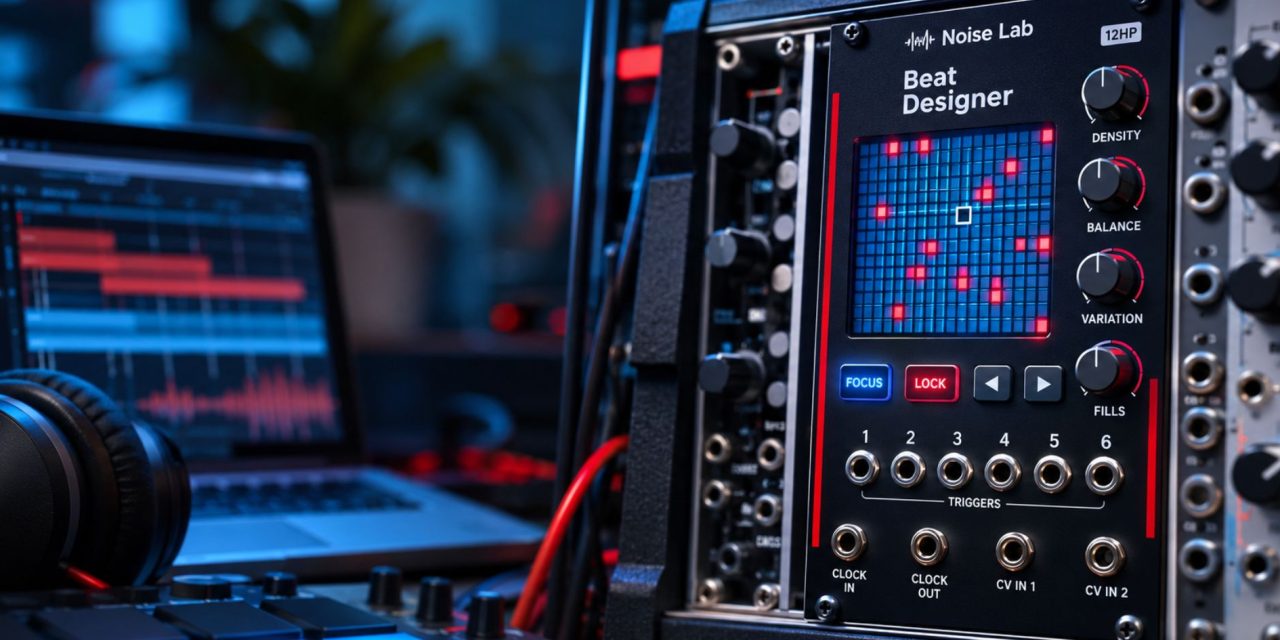
Noise Lab’s Beat Designer is a 12HP drum sequencer with six trigger outputs. Its job is to generate and control rhythmic patterns for other modules, rather than produce drum sounds itself. This distinction matters when planning a modular setup.
The separate Noise Lab Drum Designer is the sound module. Beat Designer handles the sequencing, while connected drum voices or other compatible sound sources respond to its triggers.
At the center of the sequencer is a 17-by-17 Beat Map. Neighboring positions provide related rhythmic material, giving producers different patterns to explore. Noise Lab also specifies controls for density, balance, variation and fills.
Additional connections include clock input and output, alongside two CV inputs. Together, these features provide several ways to integrate Beat Designer into a modular system.
The starting point is deciding what the drums need to contribute. A restrained vocal arrangement might call for minimal rhythmic activity. A percussion-led instrumental could benefit from more movement, even at the same tempo.
Changing One Rhythm Layer Without Rebuilding the Others
One useful feature of Beat Designer is that each channel retains its own map position. However, moving around the Beat Map normally changes the kit together.
The manufacturer’s manual explains two functions that provide more control: Focus and Lock.
Focus limits map edits to one selected channel. This allows producers to explore a different rhythm for one instrument while retaining the established patterns elsewhere. Lock protects a channel from map movement and parameter changes.
Consider a session where the kick pattern already supports the track. Rather than changing the entire kit, producers can focus on the hi-hat channel and explore alternative patterns.
The next step is listening to how that new layer interacts with the existing rhythm. Does it reinforce the pulse, introduce useful movement or distract from the musical phrase?
Changing one element at a time makes these decisions easier to follow. It also helps producers understand which rhythmic adjustments contribute to the overall arrangement.
From Groove Exploration to a Saved Arrangement
Finding an interesting pattern is only part of developing a drum arrangement. Producers also need a way to preserve useful variations and organize them into a larger musical sequence.
Noise Lab specifies storage for 260 patterns and 40 chains. Each chain can hold up to 32 cells, providing space to organize patterns into sequences.
A practical workflow could begin with three variations:
- Main groove: Save a restrained pattern that establishes the track’s rhythmic foundation.
- Alternative groove: Create a busier variation by changing selected rhythm layers while retaining the established kick or other essential parts.
- Transition: Save another variation that introduces a change before the next section.
These saved patterns can then be organized into a chain. Producers can compare how the variations work together rather than treating each pattern as an isolated idea.
Pay attention to how one section leads into the next. A transition should have a purpose within the arrangement, not simply introduce additional rhythmic activity. If it overwhelms the following downbeat, consider simplifying the surrounding parts.
This approach turns exploration into a repeatable workflow. Instead of searching for a new groove every time the arrangement changes, producers can return to saved ideas and develop them further.
What to Consider Before Integrating Beat Designer Into a Eurorack Setup
Before adding Beat Designer to a modular system, examine its clocking and CV connections. The manufacturer’s manual provides information about these connections and the module’s operation.
Start by identifying which device will supply the clock. Then determine which drum voices or sound sources will receive the six trigger outputs.
It is also worth considering how the module will fit into an existing sequencing workflow. Producers should understand how their other modules handle triggers, clock signals and CV connections before planning the arrangement.
The distinction between sequencing and sound generation remains important here. Beat Designer provides the rhythmic instructions, while connected sound sources determine which drum voices respond. Planning both sides of that relationship helps clarify the module’s role within the rack.
Making the Most of Beat Designer’s Rhythm Workflow
Noise Lab’s Beat Designer provides a structured way to explore drum patterns without programming every individual step. Its Beat Map offers a starting point, while Focus and Lock help producers control which rhythm layers change.
The storage and chain functions extend that process into arrangement development. Producers can preserve useful patterns, compare variations and organize them into sequences rather than repeatedly starting from scratch.
Ultimately, the goal isn’t to make every section busier or introduce constant variation. It’s to understand how individual rhythmic parts support the track and preserve the combinations that work.
How much of your drum arrangement would you change if you could experiment with one rhythm layer without disturbing the others? Explore more production workflows, music technology and practical studio insights at DLK Music Pro News.