Audient announced its third-generation iD desktop audio interfaces on November 12, 2026. The new range introduces RoomTune speaker correction, which runs directly on the interface’s onboard digital signal processor (DSP).
For home-studio producers, understanding where that correction operates is just as important as knowing what it does. RoomTune changes the playback signal reaching your monitors, rather than correcting the audio being recorded. Knowing this distinction helps you make more reliable monitoring decisions and avoid applying the same correction twice.
Put RoomTune on the Monitoring Side of Your Signal Chain
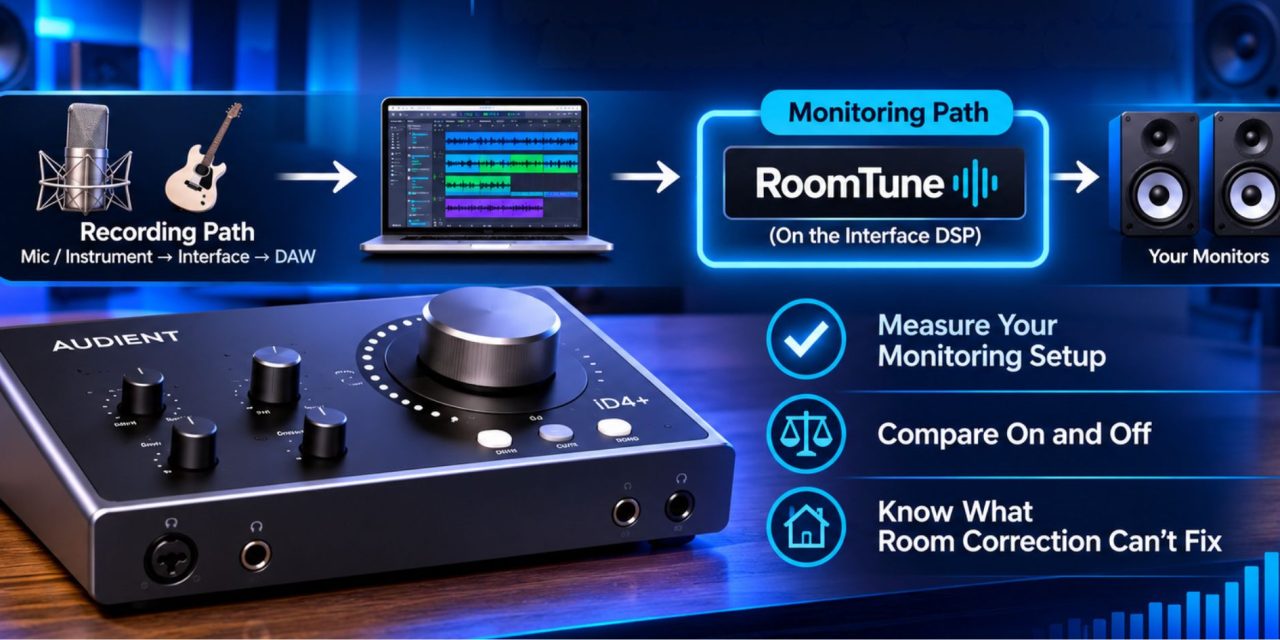
A home studio generally has two main signal paths. The recording path takes audio from a microphone or instrument into the interface and then into your DAW. The monitoring path sends playback from your computer through the interface to your speakers.
RoomTune belongs to the second path. Its purpose is to adjust the signal reaching your monitors based on the room’s acoustic characteristics.
This means the correction does not need to sit on your DAW’s master bus. It also does not automatically become part of a normal in-DAW audio export. Your exported mix remains separate from the monitoring adjustment.
However, loopback recording and external returns deserve separate attention. If you deliberately capture either signal, check the routing rather than assuming it includes or excludes RoomTune.
Audient also advertises input effects and tone shaping on its new interface range. These features serve different purposes from speaker correction. Check their routing separately before recording to understand exactly where each adjustment takes effect.
Measure the Monitoring Setup You Actually Use
According to MusicRadar’s launch coverage, RoomTune uses Audient’s RM1 reference microphone for its measurement process. The microphone comes bundled with the iD2+ and iD4+ and is available separately for other models.
Before starting, check the feature documentation for your specific interface. Supported features and setup requirements can differ across models.
Begin by positioning your speakers where you intend to use them. Establish your normal listening position and follow the measurement prompts. The resulting correction should reflect the actual arrangement of your studio.
Avoid treating the measurement as a permanent profile for every possible setup. Moving your desk, monitors or listening chair significantly changes the conditions. Reassess the setup before relying on a profile created for the previous arrangement.
The goal is to measure the environment in which you make mixing decisions. A correction profile is only useful when it reflects your actual monitoring position.
Compare RoomTune On and Off Before Changing Your Mix
Once the measurement is complete, test the correction using familiar material. A controlled comparison helps you understand its effect without confusing monitoring changes with improvements to the mix.
Try this three-step process:
- Start With a Familiar Reference Track: Play a professionally mixed track through your usual monitor outputs. Disable any separate room correction during this test. This gives you a consistent starting point.
- Compare RoomTune Engaged and Bypassed: Match the perceived playback loudness as closely as possible. Listen for clearer bass distinctions and a stable center image. A louder signal can sound better even when the correction itself offers no meaningful improvement.
- Check Your Own Mix: Repeat the comparison with a project you’re working on. Then listen through another playback system to check whether your decisions translate. If only one listening position suggests a major EQ adjustment, investigate before committing it to the mix.
These comparisons help establish whether RoomTune makes your monitoring more useful. They also reduce the risk of changing a mix simply to compensate for what you hear in one particular room.
Understand What Room Correction Cannot Fix
Room correction can improve the accuracy of your monitoring, but it cannot solve every acoustic problem. It cannot reposition speakers or eliminate excessive room decay.
Speaker placement and room acoustics still matter. Start by addressing those fundamentals, then use correction to refine what reaches your monitors.
Most importantly, keep monitoring adjustments separate from your normal mix signal. This allows your exported audio to remain independent of the correction applied in your studio.
Audient’s RoomTune brings speaker correction directly into its new iD interface platform. For home-studio producers, the practical benefit lies in understanding how that correction fits into an existing workflow.
Measure the setup you actually use, compare corrected and uncorrected playback, and avoid compensating twice for the same acoustic problem.
Are your mixing decisions reflecting the actual recording, or are you compensating for what your room makes you hear? Explore more practical audio engineering and studio workflow insights at DLK Music Pro News to make better-informed monitoring decisions.